Track progress, muscle recovery and training balance
Use charts and insights to understand how your training is changing.
Brief explanation
Use Insights to understand how your training is changing over time. It can show workout consistency, exercise progress, strength trends, measurement charts, and muscle recovery in one customizable screen.
How it works
The Insights screen is built from sections. By default, it includes Muscle Overview, Workout Calendar, and Strength Trend unless you remove them. You can add more sections with Add Section, reorder sections with Move up and Move down, or remove a section with Delete chart or Remove section.
Exercise charts use your logged workout history. Measurement charts use values from Measurements. The muscle figure uses your finished workouts to highlight recovery, training balance, or strength changes depending on the selected view.
Add an Insights section
- Tap the Insights tab.
- Tap Add Section.
- In the menu, tap the section you want to add.
- If you choose Exercise Progress, select an exercise.
- If you choose Measurement, select the measurement you want to chart.
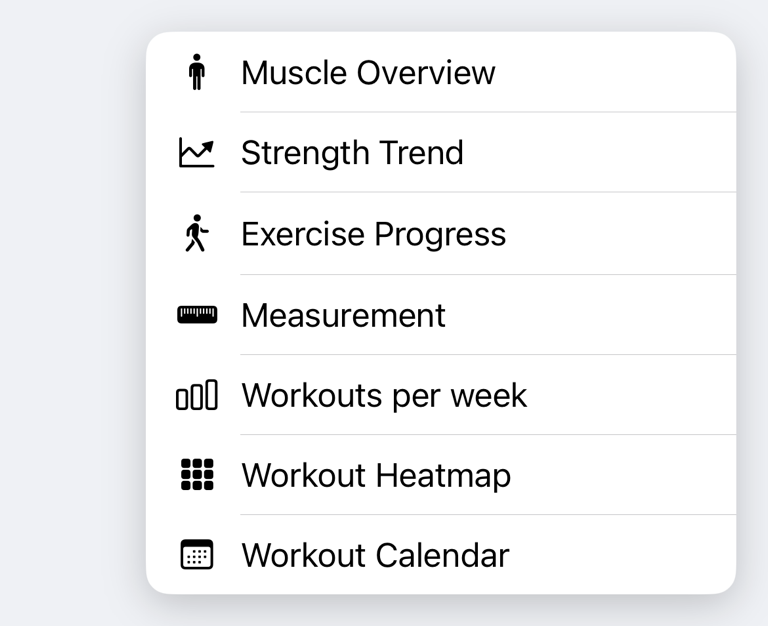
Available sections include Muscle Overview, Strength Trend, Exercise Progress, Measurement, Workouts per week, Workout Heatmap, and Workout Calendar. Workouts per week and Workout Heatmap are shown after you have at least one finished workout.
View exercise progress
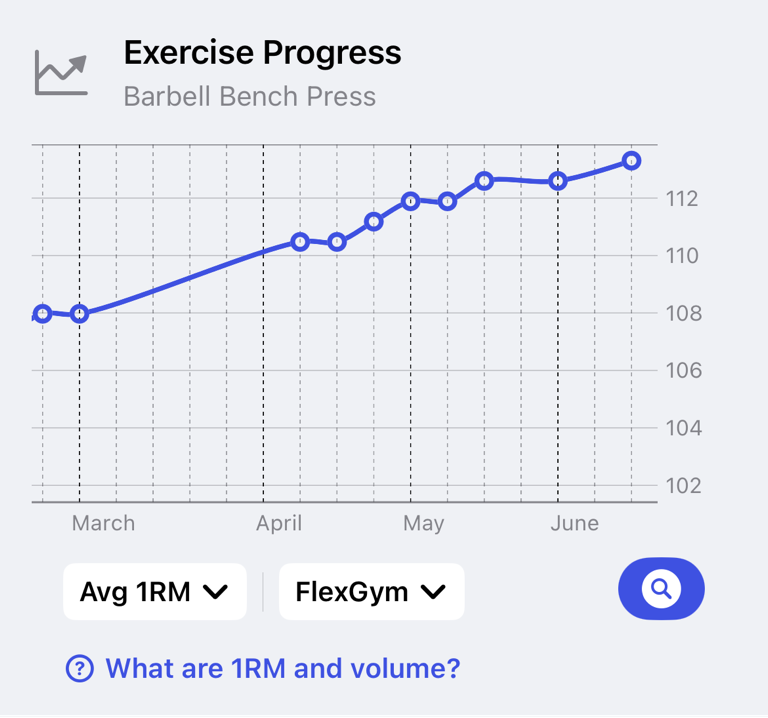
Add Exercise Progress when you want a dedicated chart for one exercise. The chart uses the exercise's logged history, so it becomes more useful after you have performed the same exercise several times.
Tap the exercise chart header to open the exercise details. From there, you can review the exercise and its history in more detail.
Understand Strength Trend
Strength Trend highlights key exercises with solid recent data. It compares recent performance with earlier workouts in the last 8 weeks and shows whether selected exercises are improving, stable, or dropping.
When there is not enough repeated exercise history, the section shows Strength Trend needs more workouts. Log a few more sessions for the same exercises to make the trend available.
Understand training balance
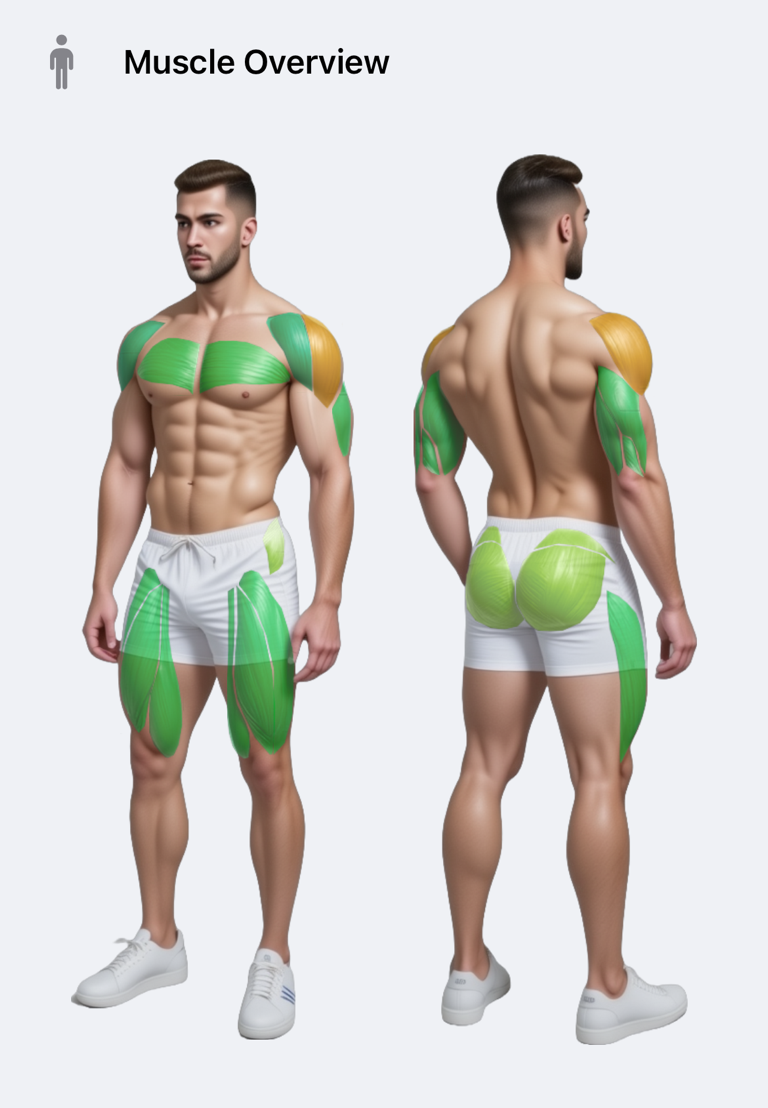
Muscle Overview can show different views of your training:
- Most Recovered Muscles
- Least Recovered Muscles
- Most Trained Muscles
- Least Trained Muscles
- Top Strength Gains
- Top Strength Losses
For trained-muscle and strength-change views, use the period selector to switch between Last 7 Days, Last 14 Days, Last 28 Days, and Last 3 Months.
Understand muscle recovery colours
Muscle recovery is estimated from your finished workouts and the muscles involved in them. Muscles trained more recently appear less recovered. Muscles with more time since their last relevant training appear more recovered.
The recovery estimate is a training guide, not a medical measurement. Sleep, soreness, nutrition, illness, and workout intensity can all make your real recovery feel different from the app's estimate.
View weekly graphs and heatmaps
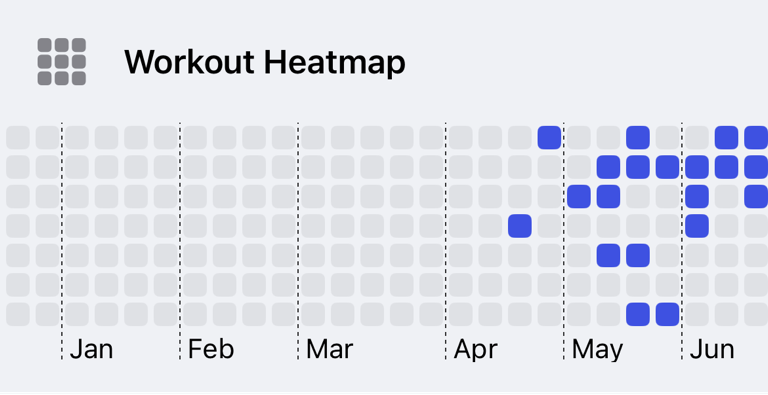
Add Workouts per week to see your weekly workout frequency as a chart. Add Workout Heatmap to see workout activity across days in a compact calendar-style view. Use Workout Calendar when you want a simpler calendar view of completed workout dates.
These sections are based on finished workouts. Planned workouts and cancelled workouts do not count as completed training history.
Common questions
Why is a chart empty?
The chart needs matching history. Exercise charts need logged sets for that exercise, measurement charts need saved values, and Strength Trend needs repeated recent workouts for the same exercises.
Can I customize the order?
Yes. Use the section menu on a chart and tap Move up or Move down. The order is saved for the Insights screen.
Why does recovery not match how I feel?
Recovery is estimated from workout history. It cannot know every factor that affects your body, so use it together with how you feel during warmups and daily life.